

Horizon Queue Manager in rConfig V8 Core
Laravel Horizon is the queue manager behind rConfig V8 Core. After reading this page, you can understand how Horizon processes background jobs, monitor queues from the dashboard, configure Supervisor and environment variables, and troubleshoot common queue problems.
Most rConfig backend work runs through Laravel’s jobs and queues system, so operations execute in the background rather than blocking the web interface. Horizon runs as a persistent process managed by Supervisor and provides a web dashboard for real-time visibility into job throughput, execution status, and queue health.
What Horizon does
Section titled “What Horizon does”Horizon manages the background execution of rConfig operations. The main responsibilities are:
- Asynchronous job processing: runs time-consuming operations in the background so the web interface stays responsive and multiple tasks process concurrently.
- Queue management: organises jobs into prioritised queues so critical operations (manual downloads, high-priority tasks) process before lower-priority work.
- Worker supervision: monitors worker processes and restarts failed workers to keep processing capacity consistent.
- Performance monitoring: reports job throughput, execution times, failure rates, and queue depths in real time.
- Batch processing: groups related jobs into batches so a single job failure does not block an entire operation. A scheduled task is sent as a batch, then delivered to queues as individual per-device jobs.
- Failed job handling: captures failed jobs with error details, stack traces, and retry actions.
Without Horizon running, none of these operations execute, which makes it critical to rConfig automation.
Queue architecture
Section titled “Queue architecture”rConfig V8 Core uses several specialised queues, processed in First In First Out (FIFO) order. Higher-priority queues are serviced before lower-priority ones, so interactive user actions (such as a manual download) complete ahead of routine scheduled work.
| Queue | Priority | Timeout | Purpose |
|---|---|---|---|
| HighPriorityQueue | 1 (highest) | 4 hrs | Critical jobs requiring immediate processing |
| ManualDownloadQueue | 2 | 4 hrs | Manual device configuration downloads triggered by users |
| TaskDownloadQueue | 3 | 4 hrs | Scheduled task configuration downloads |
| TaskSnippetQueue | 4 | 4 hrs | Snippet deployment jobs (Pro and above) |
| PolicyCompliance | 5 | 4 hrs | Policy compliance checks (Pro and above) |
| SnmpTrapQueue | 6 | 4 hrs | SNMP trap processing |
| PurgeDataJobs | 7 | 4 hrs | Data cleanup and purge operations |
| rConfigDefault | 8 | 4 hrs | General system jobs (backups, emails, maintenance) |
| default | 9 (lowest) | A few seconds | Fallback queue, not actively used |
How batches work
Section titled “How batches work”From rConfig V6, all device download jobs are sent as batches. Before batches, a scheduled task ran as a single job, so one failure or delay affected the whole operation. With batches:
- Each device becomes an individual job within the batch.
- An individual job failure does not block the other jobs.
- Per-device job status makes troubleshooting easier.
- Execution is non-blocking and runs in parallel.
- Horizon shows detailed batch status and progress.
How rConfig uses the queues
Section titled “How rConfig uses the queues”- Device backups: configuration downloads run as queued jobs in
TaskDownloadQueue(scheduled) orManualDownloadQueue(manual), so multiple devices back up concurrently. - Scheduled tasks: scheduled operations queue through the appropriate queue based on task type.
- System maintenance: backup cleanup, log archival, and purge operations run in
PurgeDataJobsandrConfigDefault.
Accessing the Horizon dashboard
Section titled “Accessing the Horizon dashboard”Open the dashboard from External Tools → System Queue Manager, or browse directly to:
https://your-rconfig-domain.com/horizonAccess is restricted to users with the admin role.
Dashboard sections
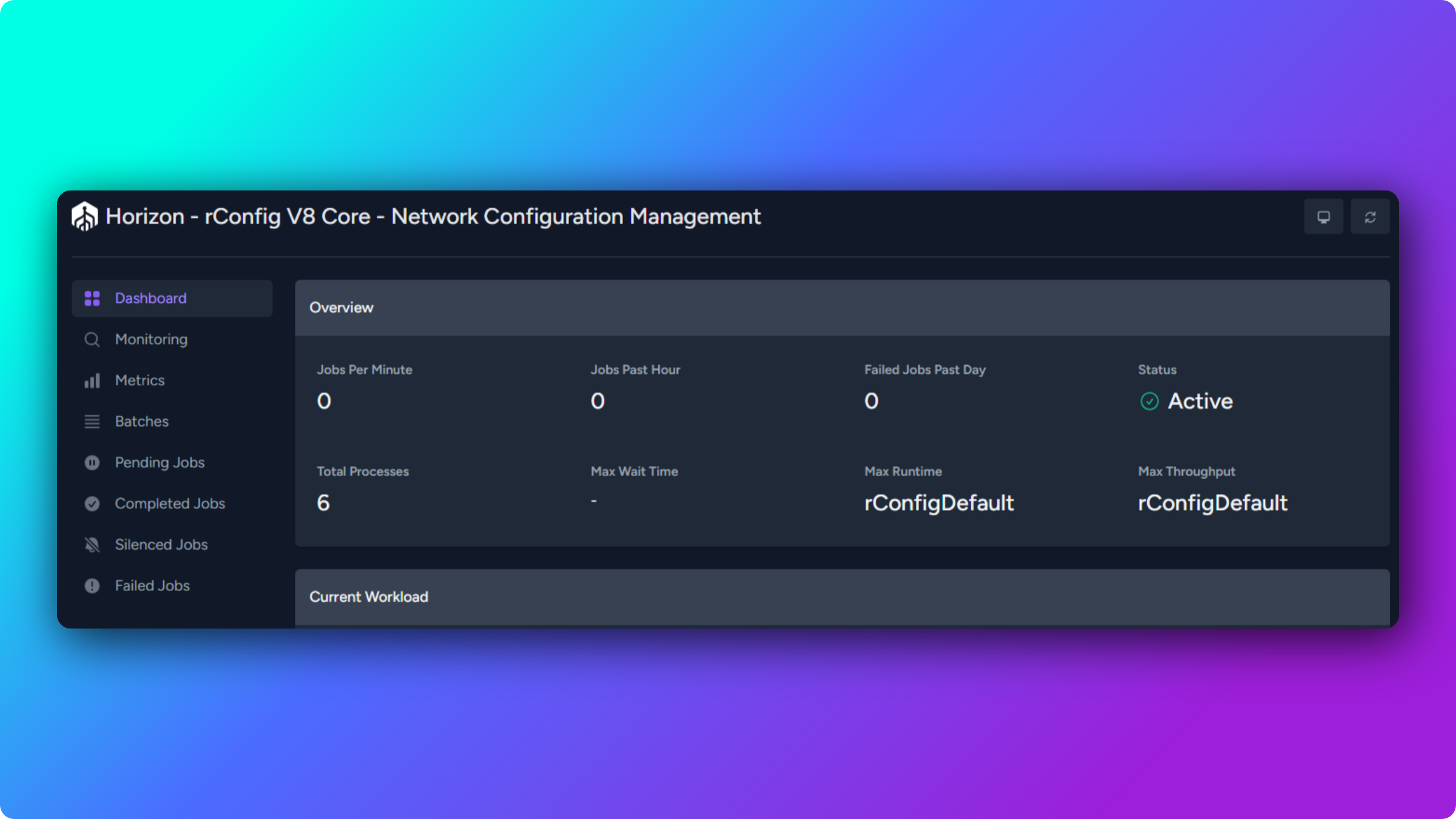
Section titled “Dashboard sections”Dashboard
Section titled “Dashboard”A high-level overview of queue system health. Key metrics:
- Jobs Per Minute: current processing rate across all queues. Higher means active work (backups or tasks running); lower means an idle period or a bottleneck.
- Processes: number of active worker processes. This should match the worker count configured in Supervisor. A much lower number suggests crashed workers.
- Jobs Past Hour: total job volume over the last 60 minutes, showing workload trends and peaks.
- Failed Jobs: count of jobs that errored. Occasional failures are normal (device timeouts, connectivity); a high rate points to a systemic problem.
- Job Status Distribution: a breakdown of pending, processing, completed, and failed jobs.
- Horizon Status: whether Horizon is actively running and processing jobs.
- Recent Jobs: the most recently processed jobs with execution time, status, and queue name.
Metrics
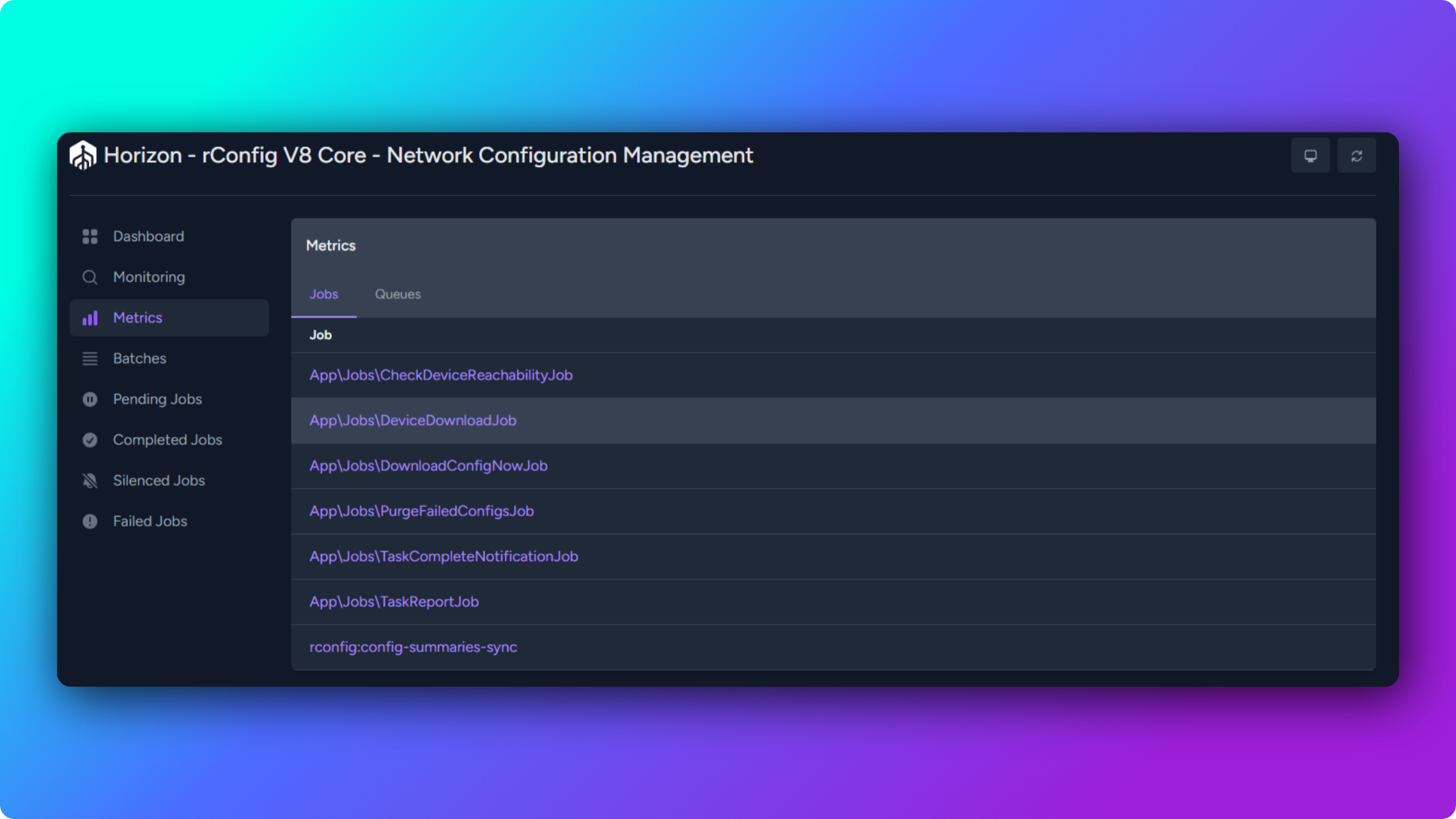
Section titled “Metrics”Historical performance data for the queue system. Available metrics:
- Jobs Processed: total job volume over the selected period, showing workload trends and peak usage.
- Throughput: jobs processed per time unit, indicating processing capacity.
- Runtime Analysis: execution time statistics that help identify slow operations.
- Jobs Failed: failure trends, showing when issues started and whether they are increasing.
- Jobs Per Minute: processing rate over time, useful for capacity planning.
- Average Wait Time: how long jobs wait before processing. High values indicate insufficient worker capacity or a backlog.
- Average Execution Time: how long jobs take to complete. Rising values may indicate performance degradation.
- Time Range Options: view the past hour, 24 hours, 7 days, or a custom range.
Batches
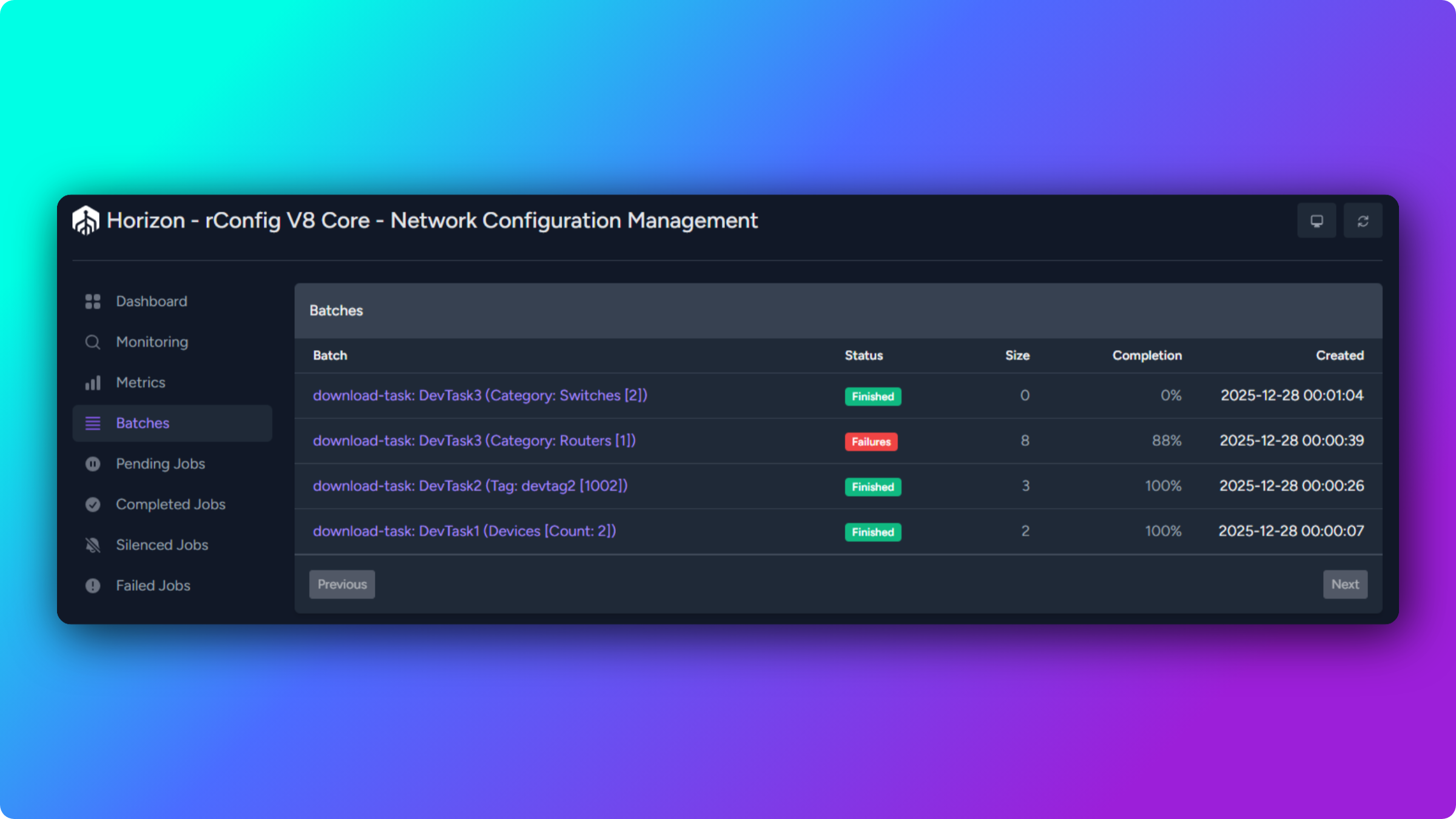
Section titled “Batches”Monitor batch job processing. The view shows:
- Batch ID and creation timestamp.
- Total jobs in the batch.
- Jobs completed, pending, and failed.
- Overall batch progress percentage.
- Individual job status within the batch.
- Batch completion status.
Batches give non-blocking execution, granular troubleshooting (identify the specific failed device), real-time progress, and parallel processing. They cover all scheduled device downloads and manual multi-device downloads.
Pending Jobs
Section titled “Pending Jobs”Jobs waiting to be picked up by a worker. The view shows the job type and class name, queue name and priority, wait time, and job payload.
A short-lived pending state during active processing is normal. Jobs that stay pending for extended periods point to worker capacity or processing problems.
Completed Jobs
Section titled “Completed Jobs”A history of successfully executed jobs, showing the completion timestamp, execution duration, queue name, and payload. This history is cleared on a system restart or rConfig update.
Failed Jobs
Section titled “Failed Jobs”A dedicated view for jobs that errored during execution. It shows the exception type and message, the full stack trace, the job payload, the failure timestamp, the queue name and connection, and the number of retry attempts.
Available actions: Retry a single job, Retry All failed jobs, Forget a job (remove it from the list without fixing the cause), and Forget All.
Job types in rConfig
Section titled “Job types in rConfig”Different job types appear in Horizon, matching rConfig operations.
| Job class | Purpose | Typical duration | Common failures |
|---|---|---|---|
App\Jobs\DeviceBackupJob | Run a configuration download for a device | 10 to 60 seconds | Connection timeouts, authentication errors, prompt mismatches |
App\Jobs\ScheduledTaskJob | Run scheduled operations (backups, maintenance) | Varies with scope | Task configuration errors, device unavailability |
App\Jobs\PurgeDataJob | Clean old configs, logs, and temporary files | Varies with data volume | Disk space issues, database lock contention |
Reading job status
Section titled “Reading job status”- Pending: queued but not yet picked up. Normal with a backlog; concerning if it persists, which points to worker issues.
- Processing: a worker is executing the job. It should move to completed or failed within a reasonable time for that job type.
- Completed: finished successfully. Review the execution time if it looks abnormally long.
- Failed: errored during execution. Review the exception details for the cause.
- Retrying: a failed job re-queued for another attempt. Watch whether the retry succeeds.
Supervisor configuration
Section titled “Supervisor configuration”Supervisor manages the Horizon process, keeping it running and restarting it if it crashes. Without Supervisor running Horizon, all background jobs stop: scheduled tasks do not execute, backups do not run, and the queue fills with pending jobs.
Supervisor is a process control system for Linux and Unix that starts Horizon at boot, monitors its health, restarts it if it exits, logs startup and errors, and manages worker processes.
Configuration differs slightly between distributions but follows the same principles.
Configuration file location:
/etc/supervisord.d/horizon.iniConfiguration file contents:
[program:horizon]; Horizon rConfig Configurationprocess_name=%(program_name)s_%(process_num)02dcommand=php /var/www/html/rconfig/artisan horizonautostart=trueautorestart=trueuser=rootredirect_stderr=truestdout_logfile=/var/www/html/rconfig/storage/logs/horizon.logstopwaitsecs=3600Key directives:
command: path to the Horizon artisan command.autostart: start Horizon when Supervisor starts.autorestart: restart Horizon if it exits.user: the system user that runs the process.stdout_logfile: where Horizon logs are written.stopwaitsecs: grace period before the process is killed (3600 seconds, to allow long-running jobs to finish).
Manage Supervisor:
# Check Supervisor statussystemctl status supervisord
# Start Supervisorsystemctl start supervisord
# Enable Supervisor to start on bootsystemctl enable supervisord
# Restart Supervisorsystemctl restart supervisord
Manage Horizon through Supervisor:
# Check Horizon worker statussupervisorctl status horizon
# Start Horizon workersupervisorctl start horizon:*
# Stop Horizon workersupervisorctl stop horizon:*
# Restart Horizon workersupervisorctl restart horizon:*
# Reload Supervisor configurationsupervisorctl rereadsupervisorctl update
Supervisor logs:
/var/log/supervisor/supervisord.logConfiguration file location:
/etc/supervisor/conf.d/horizon_supervisor.iniConfiguration file contents:
[program:horizon]; Horizon rConfig Configurationprocess_name=%(program_name)s_%(process_num)02dcommand=php /var/www/html/rconfig/artisan horizonautostart=trueautorestart=trueuser=rootredirect_stderr=truestdout_logfile=/var/www/html/rconfig/storage/logs/horizon.logstopwaitsecs=3600Key directives:
command: path to the Horizon artisan command.autostart: start Horizon when Supervisor starts.autorestart: restart Horizon if it exits.user: the system user that runs the process.stdout_logfile: where Horizon logs are written.stopwaitsecs: grace period before the process is killed (3600 seconds, to allow long-running jobs to finish).
Manage Supervisor:
# Check Supervisor statussystemctl status supervisor
# Start Supervisorsystemctl start supervisor
# Enable Supervisor to start on bootsystemctl enable supervisor
# Restart Supervisorsystemctl restart supervisor
Manage Horizon through Supervisor:
# Check Horizon worker statussupervisorctl status horizon
# Start Horizon workersupervisorctl start horizon:*
# Stop Horizon workersupervisorctl stop horizon:*
# Restart Horizon workersupervisorctl restart horizon:*
# Reload Supervisor configurationsupervisorctl rereadsupervisorctl update
Supervisor logs:
/var/log/supervisor/supervisord.logConfiguring Horizon with environment variables
Section titled “Configuring Horizon with environment variables”Horizon’s behaviour is controlled by environment variables in the .env file at /var/www/html/rconfig/.env. These settings control worker processes, timeouts, and retry behaviour.
HORIZON_PROD_TIMEOUT=60HORIZON_MIN_PROCESS=1HORIZON_MAX_PROCESS=10HORIZON_DEFAULT_MAX_PROCESS=5REDIS_QUEUE_RETRY_AFTER=130- HORIZON_PROD_TIMEOUT: seconds a job may run before it is terminated as a timeout. Default 60. Increase for long-running jobs (large backups). Must be lower than
REDIS_QUEUE_RETRY_AFTER. - HORIZON_MIN_PROCESS: minimum worker processes Horizon keeps running, applied to all queues. Default 1. Ensures baseline capacity is always available.
- HORIZON_MAX_PROCESS: maximum worker processes, applied to
HighPriorityQueue,ManualDownloadQueue,TaskDownloadQueue, andTaskSnippetQueue. Default 10. Scales workers up during high load. - HORIZON_DEFAULT_MAX_PROCESS: maximum worker processes for the default-priority queues
PolicyCompliance,SnmpTrapQueue,PurgeDataJobs, andrConfigDefault. Default 5. - REDIS_QUEUE_RETRY_AFTER: seconds to wait before retrying a job. Default 130. Must be greater than
HORIZON_PROD_TIMEOUTto prevent the same job being processed twice.
Applying changes
Section titled “Applying changes”Edit the .env file:
nano /var/www/html/rconfig/.envAfter saving, clear the application cache:
cd /var/www/html/rconfigphp artisan rconfig:clear-allThen restart Horizon. Supervisor restarts it automatically:
php artisan rconfig:clear-horizonThings to check before scaling
Section titled “Things to check before scaling”- Timeout and retry: if you raise
HORIZON_PROD_TIMEOUT, raiseREDIS_QUEUE_RETRY_AFTERabove it (at least timeout plus 30 seconds) to avoid duplicate processing. - Database connections: when raising
HORIZON_MAX_PROCESS, check the database server’s maximum allowed connections. Each worker can use a connection. Monitor withSHOW STATUS LIKE 'Threads_connected';. - Resource planning: more workers means more CPU, memory, and database connections. Balance worker count against available resources and watch performance as you scale.
Troubleshooting Horizon issues
Section titled “Troubleshooting Horizon issues”Why is Horizon showing as inactive?
Section titled “Why is Horizon showing as inactive?”The dashboard shows “Inactive”, or jobs queue but never process.
Diagnose:
-
Check Horizon status:
Terminal window php artisan horizon:statusExpected:
Horizon is running.If it reports inactive, Horizon is not running. -
Check the worker through Supervisor:
Terminal window supervisorctl status horizonExpected:
horizon RUNNING pid 12345, uptime 1:23:45. ASTOPPED,FATAL, orEXITEDstatus means Supervisor is not running Horizon. -
Check Supervisor itself:
Terminal window # CentOS / RHEL / Rocky / Almasystemctl status supervisord# Ubuntu / Debiansystemctl status supervisor
Resolve:
# 1. Ensure Supervisor is running (CentOS / RHEL / Rocky / Alma)systemctl start supervisordsystemctl enable supervisord
# Ubuntu / Debiansystemctl start supervisorsystemctl enable supervisor
# 2. Reload Supervisor configurationsupervisorctl rereadsupervisorctl update
# 3. Start the Horizon workersupervisorctl start horizon:*
# 4. Verify Horizon is runningphp artisan horizon:status
Then open External Tools → System Queue Manager and confirm the dashboard shows an active status with processing metrics.
Why is Supervisor not starting Horizon?
Section titled “Why is Supervisor not starting Horizon?”Supervisor shows FATAL or EXITED for horizon.
Check the logs:
tail -n 50 /var/log/supervisor/supervisord.logtail -n 50 /var/www/html/rconfig/storage/logs/horizon.logCommon causes:
-
Incorrect file paths in the config: verify the artisan and PHP paths.
Terminal window ls -la /var/www/html/rconfig/artisanwhich phpCorrect the Supervisor config if needed, then
supervisorctl reread && supervisorctl update && supervisorctl start horizon:*. -
Permission issues: the rConfig directory must be owned by the web server user.
Terminal window # CentOS / RHEL / Rocky / Almachown -R nginx:nginx /var/www/html/rconfig/# Ubuntu / Debianchown -R www-data:www-data /var/www/html/rconfig/ -
PHP memory limit too low: review the PHP settings reference to set optimal PHP values.
Why are jobs stuck in pending?
Section titled “Why are jobs stuck in pending?”Jobs queue but never process, staying in “Pending” indefinitely.
Check whether workers are processing:
php artisan horizon:statusIn the dashboard, check the Processes count. It should match the workers configured in Supervisor plus any extra workers up to the maximum.
Resolve:
-
Horizon running but no active workers: restart it.
Terminal window php artisan rconfig:clear-horizon# Supervisor restarts it automaticallysupervisorctl start horizon:* -
Workers active but jobs still pending: this is usually queue priority. Jobs in higher-priority queues run first, so lower-priority jobs wait while a high-priority queue is busy.
-
Consistent backlog: raise the worker count in
.env, then clear and restart.Terminal window # In /var/www/html/rconfig/.envHORIZON_MAX_PROCESS=15HORIZON_DEFAULT_MAX_PROCESS=8Terminal window php artisan rconfig:clear-allphp artisan rconfig:clear-horizon
Why are jobs failing repeatedly?
Section titled “Why are jobs failing repeatedly?”A high failure rate, with many jobs in the Failed Jobs section.
Open Failed Jobs in the dashboard, click a recent failure, and review the exception message and stack trace to find common patterns.
| Failure pattern | Example exception | Resolution |
|---|---|---|
| Device connectivity | Connection timeout, SSH connection refused | Verify reachability, credentials, and firewall rules before retrying |
| Authentication | Authentication failed, invalid credentials | Update the device credentials, then retry |
| Configuration | Command not found, invalid regex pattern | Fix the command configuration, then retry |
| Resource exhaustion | Out of memory, maximum execution time exceeded | Increase the PHP memory limit or reduce concurrent jobs |
After resolving the root cause, retry the jobs with Retry All, or retry individually after fixing specific issues.
Why is Horizon consuming excessive resources?
Section titled “Why is Horizon consuming excessive resources?”High CPU or memory use by the Horizon process, causing system slowdown.
Check usage:
ps aux | grep horizontop -p $(pgrep -f horizon)Common causes:
-
Too many concurrent workers: reduce the maximums in
.env, then clear and restart.Terminal window # In /var/www/html/rconfig/.envHORIZON_MAX_PROCESS=5HORIZON_DEFAULT_MAX_PROCESS=3Terminal window php artisan rconfig:clear-allphp artisan rconfig:clear-horizon -
Large payloads or memory growth: restart Horizon to clear memory, and schedule a regular restart.
Terminal window # Restart Horizon daily at 3 AM (crontab)0 3 * * * cd /var/www/html/rconfig && php artisan rconfig:clear-horizon -
Inefficient jobs: review execution times in Metrics. Jobs over 5 minutes may need a smaller scope (fewer devices per job) or leaner command sets.
Why is the Horizon dashboard inaccessible?
Section titled “Why is the Horizon dashboard inaccessible?”A 404 or blank page at /horizon.
Clear the application cache:
cd /var/www/html/rconfigphp artisan config:clearphp artisan route:clearphp artisan view:clearphp artisan cache:clearVerify Horizon is published:
php artisan horizon:installConfirm the web server is serving rConfig and the routes are reachable, then restart services:
systemctl restart nginx php-fpm # Nginxsystemctl restart httpd php-fpm # ApacheBest practices
Section titled “Best practices”Monitoring
Section titled “Monitoring”- Review the dashboard daily for failed jobs, unusual processing times, or growing queue depths.
- Track CPU, memory, and disk usage to confirm capacity for queue processing.
- Configure external alerting (Nagios, Zabbix, and similar) to fire when Horizon becomes inactive, failed jobs exceed a threshold, queue depth grows continuously, or worker processes stop.
- Review batch completion rates to spot systematic issues with specific device groups.
Maintenance
Section titled “Maintenance”-
Restart Horizon after every rConfig update so it picks up new code.
Terminal window php artisan rconfig:clear-horizon -
After resolving issues, clear old failed jobs so the interface stays clean. Retry the ones that may now succeed and forget the rest.
-
Review Metrics weekly. Rising average execution times, increasing failure rates, and high wait times all signal problems developing.
Capacity planning
Section titled “Capacity planning”- Baseline normal job volume and execution times so you can tell when capacity needs to grow.
- Scale workers as device count grows, balanced against system resources (database connections, PHP memory, CPU).
- Stagger scheduled tasks across time to avoid queue spikes overwhelming workers.
- For database connections, the worst case is roughly
HORIZON_MAX_PROCESSmultiplied by the number of active queues. Ensure the databasemax_connectionscovers this plus regular web traffic. The default MySQL value of 151 is often too low for larger deployments.
The values below are starting points. Adjust to actual resources and workload, and scale incrementally.
HORIZON_MIN_PROCESS=1HORIZON_MAX_PROCESS=5HORIZON_DEFAULT_MAX_PROCESS=3PHP memory_limit=256MMySQL max_connections=151 (default)HORIZON_MIN_PROCESS=1HORIZON_MAX_PROCESS=10HORIZON_DEFAULT_MAX_PROCESS=5PHP memory_limit=512MMySQL max_connections=300HORIZON_MIN_PROCESS=2HORIZON_MAX_PROCESS=15HORIZON_DEFAULT_MAX_PROCESS=8PHP memory_limit=1024MMySQL max_connections=500Quick reference
Section titled “Quick reference”Common commands
Section titled “Common commands”# Check Horizon statusphp artisan horizon:status
# Terminate Horizon gracefully (Supervisor restarts it)php artisan rconfig:clear-horizon
# Pause Horizon (stop processing new jobs)php artisan horizon:pause
# Continue Horizon (resume processing)php artisan horizon:continue
# Clear all caches after .env changesphp artisan rconfig:clear-all
# Supervisor: status, start, restart the workersupervisorctl status horizonsupervisorctl start horizon:*supervisorctl restart horizon:*
# Tail the logstail -f /var/www/html/rconfig/storage/logs/horizon.logtail -f /var/log/supervisor/supervisord.logQueue priority order
Section titled “Queue priority order”HighPriorityQueue(critical jobs)ManualDownloadQueue(user-triggered downloads)TaskDownloadQueue(scheduled downloads)TaskSnippetQueue(snippet deployment, Pro and above)PolicyCompliance(compliance checks, Pro and above)SnmpTrapQueue(SNMP trap processing)PurgeDataJobs(data cleanup)rConfigDefault(general system jobs)default(fallback, rarely used)
Supervisor locations
Section titled “Supervisor locations”| Item | CentOS / RHEL / Rocky / Alma | Ubuntu / Debian |
|---|---|---|
| Config | /etc/supervisord.d/horizon.ini | /etc/supervisor/conf.d/horizon_supervisor.ini |
| Logs | /var/log/supervisor/supervisord.log | /var/log/supervisor/supervisord.log |
| Service | supervisord | supervisor |
| Web server user | nginx | www-data |
Common issues and quick fixes
Section titled “Common issues and quick fixes”| Issue | Quick fix |
|---|---|
| Horizon inactive | supervisorctl start horizon:* |
| Jobs stuck pending | php artisan rconfig:clear-horizon |
| Failed jobs piling up | Review the failure details, fix the root cause, then retry |
| High memory usage | Reduce HORIZON_MAX_PROCESS in .env |
| Dashboard inaccessible | php artisan config:clear && systemctl restart nginx |
After .env changes | php artisan rconfig:clear-all && php artisan rconfig:clear-horizon |
| Worker not starting | Check Supervisor logs, verify paths and permissions |
What’s next
Section titled “What’s next”- Set up scheduled tasks to configure the automated operations Horizon processes.
- Run configuration backups to understand the device backup jobs that flow through the queues.
- Review the application log for context beyond the Horizon dashboard.