

rConfig V8 Core Features and Roadmap
After reading this page, I can see the full feature set that ships in rConfig V8 Core today, understand which capabilities belong to the paid editions instead, and know what the open-source roadmap is working toward next.
rConfig V8 Core is the free, open-source Network Configuration Management (NCM) platform built on 15 years of rConfig experience. Everything below is available in V8 Core unless explicitly marked as a different edition.
What ships in V8 Core today
Section titled “What ships in V8 Core today”The V8.0.0 release established the foundational architecture for modern network configuration management: automated backups, multi-vendor support, and a clean, modern interface. The sections below group the current capabilities by area.
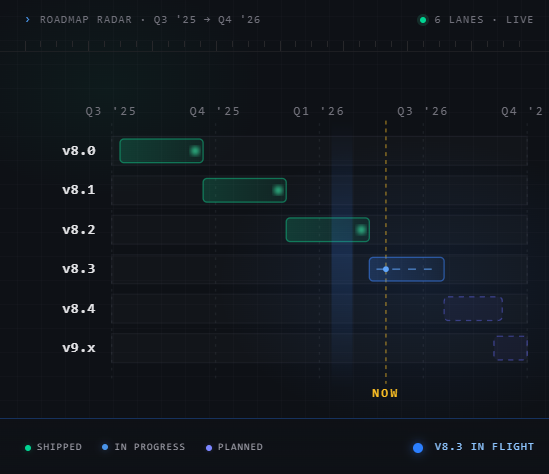 For the broader product direction across the paid editions, see the rConfig Pro and Vector roadmap.
Automated configuration backups
Section titled “Automated configuration backups”- Scheduled backup jobs with customizable intervals and timing
- On-demand backups for any device or group from the UI or API
- Multi-vendor CLI support over SSH and Telnet across Cisco, Juniper, Aruba, Fortinet, Palo Alto, MikroTik, HP, Ubiquiti, and hundreds more
- Real-time job monitoring with execution history and detailed logging
- Multi-term configuration search with All or Any matching and scope filters for tags, devices, command groups, and commands
- Advanced filtering for devices, jobs, and configurations
- Config diff and versioning with inline and side-by-side comparison, regex-based noise exclusion, and email alerts on changes
Device management
Section titled “Device management”- Device inventory with custom attributes and metadata
- Device groups for organising devices into logical sets
- Flexible tagging for categorising and filtering devices
- Bulk operations across multiple devices at once
- Device status monitoring for connectivity and backup success rates
- REST API for programmatic device management and integration with existing tooling
User interface
Section titled “User interface”- Modern UI built on the shadcn/ui component library
- Responsive layouts across desktop and mobile
- Device dashboard showing device status, backup health, and recent activity
- Job management for scheduling, monitoring, and managing backup jobs
- Configuration browser with syntax highlighting
- Config Compare for side-by-side comparison of configuration versions with change highlighting
Security and authentication
Section titled “Security and authentication”- Encrypted credential storage with encryption at rest
- Single Sign-On (SSO) support for existing identity providers
- Audit logging of user actions and system events
- Secure session handling with configurable timeout policies
Integration and automation
Section titled “Integration and automation”- REST API for triggering backups, retrieving configurations, and managing devices
- Webhook support for backup completion and system events
- Custom pre and post-backup scripts for advanced workflows
- Command-line utilities for automation and scripting
- REST API documentation and examples for integration with existing systems
Notifications and data management
Section titled “Notifications and data management”- Configurable email notifications for backup failures and important events
- Granular notification preferences per event type
- Data export in CSV and JSON
- Bulk import of device lists from external sources
Platform architecture
Section titled “Platform architecture”V8 Core runs on a modern, supported foundation:
| Component | Detail |
|---|---|
| Backend | Laravel 12 for stability and performance |
| Runtime | PHP 8.4 for current performance and security support |
| Database | MySQL or MariaDB for configuration storage |
| API | REST API for automation and integrations |
| Source | Full source code access under an open-source license |
For performance, V8 Core uses an optimised scheduler that handles hundreds of devices, SSH connection pooling to reduce overhead, asynchronous background job processing for a responsive UI, and robust error handling with retry logic.
Community and open source
Section titled “Community and open source”rConfig V8 Core is free and open-source, and the project is committed to keeping it that way.
Get involved
Section titled “Get involved”- GitHub repository for source code, issues, and contributions
- Community discussions for peer-to-peer help and tips
- Issue tracker for reporting bugs and requesting features
Ways to contribute
Section titled “Ways to contribute”- Submit pull requests for bug fixes and enhancements
- Improve the documentation and examples
- Test new releases and report issues
- Help translate the interface to additional languages
- Share your experience and feature requests
Roadmap and future direction
Section titled “Roadmap and future direction”The areas below describe where open-source development is heading. They are directional, not committed release dates.
Enhanced automation
Section titled “Enhanced automation”Deeper automation is under exploration, including scheduling that adapts to network patterns, automated device discovery and onboarding, and self-healing backup failures with automatic retry strategies.
Advanced analytics
Section titled “Advanced analytics”Configuration data is a rich source of insight into network health. Planned analytical work includes change trend analysis, device health scoring, and predictive alerting for potential issues.
Extended protocol support
Section titled “Extended protocol support”As infrastructure evolves, V8 Core aims to expand protocol coverage, including NETCONF and YANG for modern devices, gRPC for cloud-native infrastructure, and REST APIs for programmable networking equipment.
Container and cloud support
Section titled “Container and cloud support”Future work targets modern deployment patterns, including broader Docker support, Kubernetes deployment options, and a cloud-native architecture for flexible deployments.
What’s next
Section titled “What’s next”- Read the V8 Core overview to understand the platform at a glance
- Install rConfig V8 Core with the full setup instructions
- Harden your deployment before going to production
For source code, feature requests, and community support, see the rConfig GitHub repository and GitHub discussions, or email info@rconfig.com.