

Network Device Commands Configuration for rConfig V8 Core
rConfig V8 Core Commands
Section titled “rConfig V8 Core Commands”Commands are the fundamental building blocks of rConfig’s configuration management workflow. They represent the specific instructions sent to network devices during backup operations, with each command’s output captured and stored for configuration management and compliance verification purposes.
Understanding how commands work within rConfig is essential for effective network configuration management. Commands work in conjunction with Command Groups (previously known as Categories) to define what information gets retrieved from your network devices and how that information is processed, compared, and stored.
Understanding Commands in rConfig
Section titled “Understanding Commands in rConfig”What Are Commands?
Section titled “What Are Commands?”In rConfig V8 Core, a command is more than just a text string sent to a device. Each command is a configured entity with specific behaviors, comparison rules, and processing instructions. When rConfig executes a device backup, it sends each command in sequence to the device and captures the output for storage and analysis.
Commands can be:
Single Commands: Individual instructions that retrieve specific information from a device, such as show ip int brief or show version.
Command Sets: Multiple commands combined with line breaks between command strings. When line breaks are present, rConfig sends each command in the set sequentially and processes their outputs according to the command’s configuration.
Why Command Configuration Matters
Section titled “Why Command Configuration Matters”Proper command configuration directly impacts:
Storage Efficiency: Through intelligent change detection and selective file saving, properly configured commands reduce disk space usage and database overhead.
Change Detection Accuracy: Advanced comparison options ensure that meaningful changes are detected while ignoring irrelevant variations like timestamps or dynamic counters.
Notification Relevance: Fine-tuned command settings ensure that alerts are sent only when substantive changes occur, reducing alert fatigue.
Compliance Verification: Configuration Integrity Checks (CIC) validate that retrieved configurations are complete and valid, critical for audit and compliance requirements.
Command Types and Examples
Section titled “Command Types and Examples”Understanding the different ways commands can be structured helps optimize your backup workflows for different scenarios.
| # | Type | Command | Comment |
|---|---|---|---|
| 1 | Single Command | show ip int brief | Standard single command format. Must be unique, minimum 3 characters, maximum 255 characters. Special characters including pipes are supported. |
| 2 | Command Set | show clock\nshow version | Multiple commands with line breaks. All output downloads to a single configuration file. Use this approach when commands are logically related or when device performance requires grouping. |
| 3 | Complex Command | show running-config | section interface | Commands with pipes and filters are fully supported. Useful for retrieving specific configuration sections. |
When to Use Command Sets vs. Individual Commands
Section titled “When to Use Command Sets vs. Individual Commands”Use Command Sets when:
- Commands retrieve logically related information
- Device response time benefits from reduced connection overhead
- Output should be stored in a unified file for comparison purposes
- Commands are always executed together in your operational procedures
Use Individual Commands when:
- Different comparison rules apply to different outputs
- Selective CIC validation is needed for specific commands
- Change notifications should trigger independently
Adding and Editing Commands
Section titled “Adding and Editing Commands”Step-by-Step: Creating a New Command
Section titled “Step-by-Step: Creating a New Command”Prerequisites:
- Administrative access to rConfig V8 Core
- Understanding of device command syntax for your network equipment
- Knowledge of which Command Group the command should belong to
Procedure:
- Navigate to Inventory -> Commands in the main menu
- Click the Add Command button
- Enter the command string in the Command field
- Assign the command to one or more Command Groups
- Configure command behavior using the toggle switches
- Set comparison options if the command requires specialized diff handling
- Save the command configuration
Validation Steps:
- Verify the command appears in the commands table
- Confirm the command is associated with the correct Command Group(s)
- Test the command execution during a device backup to ensure proper output capture
Command Configuration Toggles
Section titled “Command Configuration Toggles”When a command is added to the database, three toggle switches control critical aspects of command behavior. Understanding these toggles is essential for optimizing your backup workflows and ensuring proper change detection.
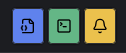 Command Configuration Toggles
Change Notifications Toggle
Section titled “Change Notifications Toggle”Change Notifications: When enabled, rConfig sends email notifications when the command output changes compared to the previous execution. This feature provides real-time awareness of configuration changes across your network infrastructure.
When to enable:
- Critical configuration commands where changes require immediate attention
- Commands that monitor security-sensitive configurations
- Commands where unauthorized changes must be detected quickly
- Commands that track compliance-critical settings
When to disable:
- Commands that retrieve frequently changing information (e.g., interface counters)
- Commands where changes are expected and routine
- Test or development environments where change notifications would create alert fatigue
Best practice: Enable change notifications selectively for commands that represent substantive configuration changes. Combine with comparison exclusions (documented below) to filter out benign changes like timestamps while still alerting on meaningful modifications.
Bulk Assign Commands
Section titled “Bulk Assign Commands”For organizations managing hundreds of commands across multiple Command Groups, the bulk assignment feature streamlines command organization and reduces administrative overhead.
When to Use Bulk Assignment
Section titled “When to Use Bulk Assignment”Initial deployment: When setting up rConfig for the first time and organizing existing commands into Command Groups.
Reorganization projects: When restructuring your Command Group hierarchy or consolidating categories.
Vendor-specific groupings: When assigning multiple vendor-specific commands to appropriate Command Groups simultaneously.
Workflow standardization: When implementing new backup workflows that require multiple commands to be grouped together.
Bulk Assignment Process
Section titled “Bulk Assignment Process”- Navigate to the Commands section
- Select multiple commands using the checkbox selectors
- Click the Bulk Assign action
- Choose the target Command Group(s)
- Confirm the assignment
- Verify that selected commands now appear in the target Command Group(s)
Note: Bulk assignment is additive. Commands retain their existing Command Group associations unless explicitly removed.
Command Syntax Guidelines
Section titled “Command Syntax Guidelines”Single command:
show running-configCommand set:
show clockshow versionshow interfacesCommand with pipe:
show running-config | section interfaceRequirements:
- Minimum length: 3 characters
- Maximum length: 255 characters
- Special characters and pipes supported
- Must be unique within rConfig installation
Summary
Section titled “Summary”Commands form the foundation of rConfig’s configuration management capabilities. By properly configuring commands with appropriate toggles, comparison options, and exclusion patterns, organizations can achieve efficient, accurate, and actionable network configuration management.
Key Takeaways
Section titled “Key Takeaways”Command configuration directly impacts storage efficiency: The “Keep Unchanged Config” toggle can reduce storage requirements by 90% or more in stable network environments by saving files only when changes occur.
Intelligent comparison prevents alert fatigue: Properly configured diff exclusions and comparison options ensure that notifications trigger only for meaningful changes, not benign variations like timestamps or uptime counters.
CIC validation ensures backup completeness: Enabling Configuration Integrity Checks on critical commands provides confidence that complete configurations are being retrieved and stored.
Multiline pattern support handles complex exclusions: The ability to exclude multi-line content like certificates and configuration blocks provides flexibility for filtering diverse device output formats.
Strategic toggle configuration optimizes operations: Understanding when to enable or disable each toggle based on command purpose ensures optimal balance between storage efficiency, change detection accuracy, and notification relevance.
Implementation Approach
Section titled “Implementation Approach”Organizations implementing or optimizing commands in rConfig should follow a progressive approach:
Phase 1 - Basic setup: Create commands with standard syntax, assign to Command Groups, enable basic toggles.
Phase 2 - Optimization: Enable “Keep Unchanged Config” for appropriate commands to optimize storage.
Phase 3 - Refinement: Add comparison exclusions to filter false positive changes, configure context and other comparison options.
Phase 4 - Notification tuning: Enable change notifications selectively based on observed change patterns and organizational requirements.
Phase 5 - Continuous improvement: Review and adjust exclusion patterns, comparison options, and toggle settings based on operational experience.
This progressive approach ensures stable operation while continuously improving the accuracy and efficiency of your configuration management workflows.
Next Steps
Section titled “Next Steps”After configuring commands, proceed to:
- Test command execution through manual device backups
- Review diff output to identify any false positive changes
- Configure exclusion patterns for identified benign variations
- Enable change notifications for critical commands
- Monitor storage utilization and adjust “Keep Unchanged Config” settings
- Document your command standards for consistency across teams
- Schedule regular reviews of command configurations to ensure continued optimization
With properly configured commands, rConfig provides comprehensive, efficient, and actionable network configuration management that scales from small networks to enterprise environments with thousands of devices.